
Siemens Product

6FC5303-1AF02-8BG0

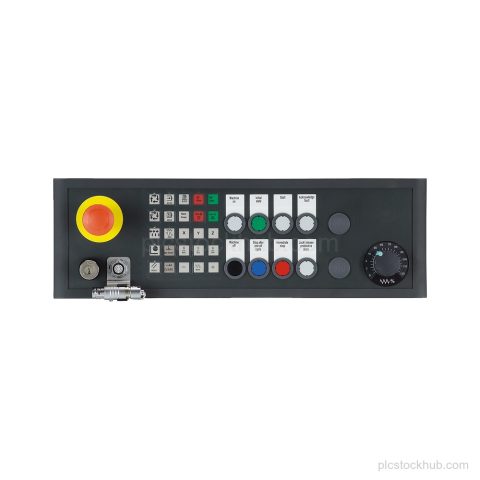
Siemens 6FC5303-1AF02-8BG0 is a SINUMERIK pushbutton panel MPP 483 HTC-S30 with MPI/PROFIBUS DP connection and connection for HT 8. Product cancellation applies; check stock and spare-part details by inquiry.

Product Record

6FC5303-1AF02-8BG0

Siemens 6FC5303-1AF02-8BG0 is a SINUMERIK pushbutton panel MPP 483 HTC-S30 with MPI/PROFIBUS DP connection and connection for HT 8. Product cancellation applies; check stock and spare-part details by inquiry.

Product 6FC5303-1AF02-8BG0
Supply Status in stock
Product Category SINUMERIK Stock & Spares
Quote Terms Confirmed by RFQ
Product Code
6FC5303-1AF02-8BG0
Weight
3 kg
Lifecycle
Product cancellation
Availability
in stock
Lead Time
Confirmed with quotation

The quotation will state the offered condition, price and estimated lead time for the requested model and quantity.

Technical Content

Product Details

Technical Summary

Product designation SINUMERIK pushbutton panel MPP 483 HTC-S30
Connection MPI/PROFIBUS DP
HT 8 connection Connection for HT 8
Variant customer-specific variant based on 6FC5303-1AF00-8AA1
Lifecycle Product cancellation
Product type spare part

Applications

MPI/PROFIBUS DP connection

Connection for MPI/PROFIBUS DP with HT 8.

Key Features

SINUMERIK pushbutton panel

SINUMERIK pushbutton panel MPP 483 HTC-S30.

MPI/PROFIBUS DP connection

Connection for MPI/PROFIBUS DP.

Connection for HT 8

Includes connection for HT 8.

Customer-specific variant

Customer-specific variant based on 6FC5303-1AF00-8AA1.

Product lifecycle

Product cancellation.

Frequently Asked Questions

What is Siemens 6FC5303-1AF02-8BG0?

It is a SINUMERIK pushbutton panel MPP 483 HTC-S30 spare part.

What connections does 6FC5303-1AF02-8BG0 have?

It has connection MPI/PROFIBUS DP with connection for HT 8.

What is the lifecycle status of 6FC5303-1AF02-8BG0?

Product cancellation.

Is 6FC5303-1AF02-8BG0 a standard variant?

It is a customer-specific variant based on 6FC5303-1AF00-8AA1.
RFQ Details

Request Quote

Send the exact model, required quantity and destination. Add the required condition or technical question in the message.

  • Complete model or MLFB
  • Required quantity and condition
  • Destination and delivery requirement

Product RFQ

Request a Quote