

Technical Summary
| Product designation | 6FC5303-1AF02-8BH0 |
|---|---|
| Component type | spare part |
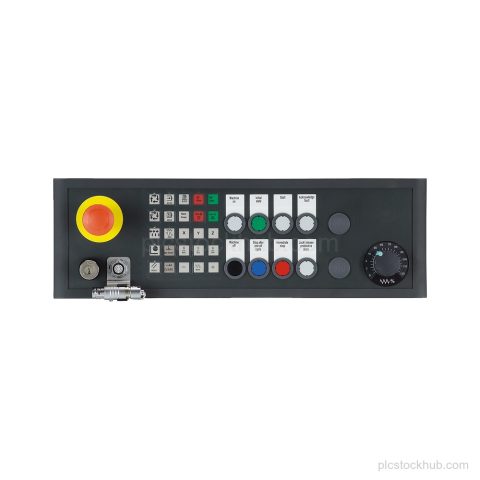
| Panel type | SINUMERIK pushbutton panel MPP 483 HTC-S31 |
| Connection | MPI/PROFIBUS DP |
| Additional connection | HT 8 |
| Variant | customer-specific variant based on 6FC5303-1AF00-8AA1 |
| Lifecycle | Product cancellation |
Applications
MPI/PROFIBUS DP panel connection
Connection of the pushbutton panel to MPI/PROFIBUS DP.
HT 8 connection
Connection for HT 8.
Key Features
SINUMERIK pushbutton panel
Spare part for the SINUMERIK product family.
MPP 483 HTC-S31
Customer-specific variant identified as MPP 483 HTC-S31.
MPI/PROFIBUS DP connection
Provides connection for MPI/PROFIBUS DP.
Connection for HT 8
Includes connection for HT 8.
Product cancellation
Lifecycle status is product cancellation.
Net weight
3,000 Kg.
Frequently Asked Questions
What is Siemens 6FC5303-1AF02-8BH0?
It is a SINUMERIK pushbutton panel spare part, MPP 483 HTC-S31.
What connections does 6FC5303-1AF02-8BH0 have?
It has connection for MPI/PROFIBUS DP and connection for HT 8.
What is the lifecycle status of 6FC5303-1AF02-8BH0?
Product cancellation.
What is the net weight of 6FC5303-1AF02-8BH0?
3,000 Kg.